
The Checkout Business Account was one of Checkout's most significant product shifts in recent years, moving beyond payment processing towards a financial operating system for merchants.
In 2023, $64 billion flowed through Checkout's currency accounts and $63 billion was swept out to external banks. Research with treasury and finance teams showed why so little money stayed on platform. Merchants could see funds inside Checkout, but they did not have the visibility, structure or control they needed to manage them there. Settlement timing was difficult to understand, reconciliation happened across different reports and tools, and the product gave them few reasons to keep using those funds once they became available.
At the same time, Checkout's financial capabilities were becoming broader. Balances, Transfers, Settlements, FX, Cards and other products were either already present or being developed across different parts of the organisation, but they had grown as separate experiences with their own flows, behaviours and terminology. Simply adding more capability would have made that fragmentation worse.
The opportunity was to bring those two problems together. If Checkout wanted merchants to keep and use more of the money already flowing through the platform, we needed to give them a coherent financial home where they could understand their position and then hold, move, access, spend and monitor funds without feeling as though they were moving between unrelated products.

The Business Account became the layer that connected those capabilities around the same account structure, balance states and financial behaviour. Balances showed where money was and what state it was in; Transfers, Settlements, FX and Cards gave merchants ways to use it; Accelerated Settlements changed when it could be accessed; and Activity helped explain what had happened afterwards. Some of those capabilities already existed, while others were introduced as the Business Account developed, but they needed to feel like parts of the same product rather than tools that happened to share the same Dashboard.
As Director of Product Design, I led the design direction for the Business Account and the designers working across it. My own hands-on work was deepest in the core account architecture and Balance experience, defining how Client, Entity, Business Account and Sub-account related to one another, how balances and activity were structured, and how that financial hierarchy translated into the product experience.
The designers I led owned the detailed work across areas including Transfers, Settlements, Accelerated Settlements and Cards. I worked closely with them through discovery, workshops, critique and delivery, shaping the key experience decisions and making sure each area reinforced the same account structure and behaviours rather than developing its own interpretation of how the product worked.
I also worked closely with Product and Engineering leadership on the decisions that crossed those boundaries, connecting roadmaps, resolving dependencies and bringing shared foundations forward when one team's work affected another part of the Business Account. Product, Design and Engineering worked together from discovery through delivery, using merchant research and workshops to define account behaviour before individual solutions hardened, then recurring critiques and cross-team sign-offs to keep those decisions connected as teams moved at different speeds.
The result was a connected product experience built around the merchant's money rather than Checkout's internal product boundaries, giving existing and new financial capabilities a shared structure they could continue to extend over time.
When merchants processed payments through Checkout, funds landed in currency balances beneath their Entities before being swept to an external bank account. Although that money sat inside Checkout for a period of time, the product did very little to help merchants understand or manage it while it was there, so finance teams still relied on other systems once they needed to work with those funds properly.
Balances, Settlements, Transfers and reports exposed different parts of the same financial picture, but they were designed as separate experiences rather than as parts of one coherent account. Finance teams had to move between them, export data and reconcile information elsewhere before they could build an accurate view of where their money was, what had happened to it and what they could do next.
As merchants grew across legal entities, currencies and regions, that fragmentation became increasingly difficult to manage. Finance teams needed to understand how much money they had, where it was held, what state it was in, when it would become available and how it could be moved without creating new reconciliation problems. Checkout already held the funds, but merchants could not reliably understand or operate those funds while they were on platform.
If they were going to keep more money with Checkout rather than sweeping it elsewhere, they needed enough visibility and control to manage it there with confidence. That meant doing more than adding actions around an existing balance. Payment data, balances, settlement timing and money movement needed to come together around an account structure that gave merchants a clear view of their position and a reliable place to operate from.
Checkout already sat directly inside the payment flow, with funds held across currencies and Entities and capabilities emerging around payouts, cards, FX and treasury operations. What was missing was the product structure that connected those capabilities to the money itself and made them feel like parts of the same financial system.

Above: The legacy Balances page exposed account data, but finance teams still had to work manually across multiple surfaces and external tools to understand and manage their position.
We spoke to treasury managers, finance leads, finance operations managers and VPs of Finance across enterprise merchants, including BNPL providers, remittance businesses, iGaming platforms and multi-entity retail groups. Although their businesses looked very different, the same underlying problems came up repeatedly, particularly as the number of Entities, currencies and settlement flows increased.
The research showed that the problem had moved well beyond helping a merchant find a payout. Finance teams needed to understand what funds they had, where those funds were held, when they would become usable and how moving them would affect the rest of their position, but Balances, Settlements, Transfers, Cards and reports still behaved like separate parts of the Dashboard rather than different views and actions within the same financial system.
That fragmentation would become harder to manage as we introduced FX, Cards, Accelerated Settlements and Yield, because each capability needed to connect back to the same account structure and the same understanding of where money lived. Without that foundation, expanding the product would simply create more places for merchants to go and more behaviours for them to understand.
Connecting those capabilities around a clear account structure meant merchants could understand and operate more of their money inside Checkout, rather than moving it elsewhere before it became useful.
The Business Account needed a product strategy that went beyond improving how merchants saw their balances. Once funds could be understood and trusted inside Checkout, merchants needed ways to use them, access them at different points in their lifecycle and get more value from keeping them on platform.
Rather than organising that strategy around Checkout's internal product lines, we focused on the jobs merchants needed to perform with their money and the order in which those capabilities needed to develop.
The first job was to make the Business Account a credible financial home, giving merchants a clear way to see funds, understand their position, move money with confidence and trust that the account behaved predictably. Once that foundation was in place, the product could expand into broader ways of accessing, using and getting more value from those funds without changing the underlying account structure or asking merchants to learn a different system each time.
We framed the Business Account around five core jobs: Store. Move. Borrow. Grow. Monitor.
Store was about making funds visible and trustworthy. Balances, Funds Pooling and Top-ups belonged here because they defined where money lived, what state it was in and when it could be used. This had to come first because merchants cannot move money confidently if they do not trust the balance they are moving it from.
Move was about putting funds to work. Transfers, Settlements and Corporate Cards all changed the position of funds, either within the Business Account or out to external destinations. This depended on Store being clear, because every movement needed a visible source, destination, currency and outcome before a merchant could commit to it.
Borrow was about accessing funds earlier. Accelerated Settlements brought forward money merchants were already due to receive, without changing the underlying settlement structure. We deliberately held this back until settlement flows were legible. In testing, merchants would not use acceleration confidently if they did not understand what was being brought forward, what remained scheduled and how the standard settlement flow worked.
Grow was about making stored funds work harder while they remained on platform. Yield only made sense once merchants were comfortable leaving funds inside the Business Account. The account first had to feel trustworthy as a place to hold and manage money before it could credibly offer a return on those funds.
Monitor ran through the whole framework. It was not a separate product area in the same way as Store, Move, Borrow and Grow. It was the layer that made the rest of the system credible. Merchants needed to see the balance, but they also needed to understand what changed, why it changed and where to investigate when something did not look right.
Organising the Business Account around Store, Move, Borrow, Grow and Monitor gave merchants a consistent way to understand how the different capabilities related to their money, while giving product teams a shared framework to build against.
It allowed the Business Account to grow in capability without losing clarity, with Cards, Accelerated Settlements, Yield and future products extending the same underlying account structure, balance states and ledger behaviour rather than fragmenting the Dashboard into separate financial products over time.
Keeping more money on platform depended on giving merchants a clearer way to understand where that money lived and how they could operate it. A Client could already contain multiple Entities, and each Entity could hold funds across different currencies, but those currency balances were largely exposed as data inside the Dashboard rather than as accounts finance teams could understand and work from directly.
Because the structure of those funds was not clearly represented in the product, finance teams still relied on reports, spreadsheets and external treasury tools to reconstruct their real position before they could make decisions. If the Business Account was going to become somewhere merchants were comfortable keeping and using money, the underlying financial structure needed to become explicit in the experience.
Finance teams needed to see where money sat, how it related to the legal structure of their business and how the different balances underneath it fitted together, while still being able to move between a group-wide view and the detail of an individual account without losing that context.
Before we designed screens, Product, Design, Commercial and Engineering worked through where funds were held, how merchants organised their businesses, what they needed to do with those funds and what the platform could realistically support. Establishing those relationships first meant we could design the interface around the way the financial system actually worked rather than allowing the navigation or existing Dashboard structure to dictate the account architecture.
A Client represented the overall business group. An Entity represented a legal entity within that group, such as a UK Ltd or SAS. Each Entity had a Business Account, which provided the financial account through which that Entity's funds were held and managed, with its default currency used to express the consolidated value of the funds beneath it. Within the Business Account, Sub-accounts represented individual currencies, with each Sub-account carrying its own balances, balance states and transaction history.
Above: The account hierarchy shows how a Client contains multiple Entities. Each Entity has a Business Account with a default currency and one or more currency-specific Sub-accounts.
Checkout already supported multiple currency balances beneath an Entity, so the restructuring was not about introducing multi-currency support. Previously, a GBP, EUR or USD balance was simply a balance held beneath an Entity. We restructured those balances as explicit Sub-accounts within the Business Account, so each currency became an account in its own right, with its own balance states, activity and transaction history. The Client and Entity levels then rolled those accounts up into consolidated views, allowing finance teams to understand their wider position without losing the detail underneath.
We tested the proposed structure against the actual jobs merchants needed to perform with money, including funds coming in, holding balances, moving money between currencies and moving money out of Checkout. This allowed us to see whether the relationships still made sense once real workflows were layered onto them and helped us identify where the boundaries between Client, Entity and Sub-account needed to sit.
Above: Mapping core financial tasks across funds inflow, holding funds and funds outflow, helping the team test the account structure against how money actually moved.
Those workflows also made it clear that account structure and balance states could not be designed independently. Terms such as Available, Pending, Operational, Collateral and Payable were not consistently understood, even though those distinctions determined what merchants could actually do with their money. Showing someone where funds live is only useful if they can also understand what state those funds are in and what that state means operationally.
Above: Early exploration of Client, Entity and Sub-account relationships across different regions, currencies and product areas.
In the legacy product, merchants could see balances, settlements, transfers and reports in different places, but there was no single financial home connecting those experiences together. Finance teams moved between separate surfaces to understand where funds were, what had changed and what was likely to happen next, often taking that information outside Checkout before it became useful.
The Business Account reorganised those capabilities around the account itself. Balances showed the current position, Transfers, FX, Cards and Settlements changed that position, and Activity explained how and why it had changed over time. Currency balances therefore became something merchants could actively operate from rather than something they mainly observed and reconciled.
Above: Workshop exploration comparing the existing reporting-led structure with an account architecture organised around balances, settlements, transfers and the movement of funds.
A single consolidated balance would have hidden too much of the structure larger merchants were actually managing. Businesses operating across multiple legal entities, regions and currencies often had different teams responsible for different parts of the organisation, so a local finance team might only need to work within one Entity while a central treasury team needed to understand the position across the whole Client.
The hierarchy supported both without requiring separate experiences. A merchant could start with a consolidated view across the Client, move into a specific Entity and then down into the individual currency Sub-accounts beneath it, with each level preserving the relationship to the one above. The same structure also gave us a consistent basis for permissions, allowing users to work across the parts of the organisation they were responsible for without needing access to everything.
Settlements, Transfers, Cards, Acceleration and future capabilities could then use the same Entities, Sub-accounts, permissions and ledger behaviour rather than creating their own interpretation of where money lived and how it should be organised. That consistency mattered because the Business Account needed to become broader over time without turning into another collection of disconnected financial tools.
A global merchant could have several legal entities, each holding multiple currencies, with different teams responsible for different parts of the business. That complexity was real, so flattening everything into one balance would have made the interface appear simpler while removing the structure finance teams actually needed in order to understand and control their money.
The design therefore needed to support different levels of detail without making them feel like separate products. At Client level, finance teams could understand the overall position across the business. At Entity level, they could see the Business Account and the consolidated value of its funds in the default currency. At Sub-account level, they could work with an individual currency account and understand its balance states, transaction history and activity.
Above: Working view of how the account hierarchy translated into the interface, connecting Client, Entity and Sub-account views with balances, transactions, cards and activity.
Because each level represented the same financial system at a different level of detail, a central treasury team could move from a group-wide position into a specific account to investigate or take action without losing sight of how that account related to the wider business.
That structure became the foundation for Balances, Settlements, Transfers, Cards, Acceleration and later capabilities, all of which could extend the same account and ledger architecture rather than adding another disconnected part of the Dashboard. As the Business Account expanded, new capabilities could connect back to the same understanding of where the merchant's money lived and how it behaved.
Turning the structure into a product
Defining the account structure gave us a shared foundation, but making the Business Account feel coherent meant carrying that structure through every part of the product while several teams were designing and building different areas in parallel. Balances, Transfers, Settlements, Cards and Activity all touched the same money, so decisions about balance states, account relationships, terminology and movement could not be made independently without recreating the fragmentation we were trying to remove.
Product, Design and Engineering worked together from the point we were defining how the experience should behave, rather than Design completing a solution and handing it over to be built. Workshops were used to work through the financial rules, data, technical constraints and edge cases before detailed design progressed, with engineers involved in questions such as when a balance changed, what state money moved into, what information was available at each point and how those behaviours would be represented to the merchant. That meant the underlying system shaped the experience early, while Design could challenge implementations that were technically valid but difficult for merchants to understand.
We kept that collaboration going through delivery. Solution reviews aligned Product, Design and Engineering on the intended behaviour before teams moved too far into execution, design reviews tested the experience and interaction decisions against the wider Business Account, and build reviews checked that the implementation still reflected what had been agreed. When something changed during development, it came back into the same conversation rather than being resolved inside one team and creating a different rule somewhere else in the product.
I led the designers working across the Business Account while staying close to the work myself, particularly where decisions crossed between areas or affected the wider system. The designers owned the detailed work within their products, and my role was to help shape the key decisions, challenge the thinking where needed and make sure the experience remained coherent as those individual areas developed at different speeds.
Store – making balances trustworthy
Store covers how funds are held and understood across the Business Account. Every transfer, settlement, card payment or accelerated payout ultimately changes a balance, so merchants needed a clear view of what money they had, where it sat and what state it was in before they could act on it with confidence. Those funds were distributed across Sub-accounts, currencies and balance states that changed over time, which meant making those relationships understandable without turning the experience into another reporting surface.
Balances
Each Sub-account holds multiple balance types representing where funds are in their lifecycle and what they can be used for. Available reflects funds that can be used immediately or settled, Pending reflects incoming funds that have not yet cleared, Payable represents funds reserved from Available for outgoing payments in transit, Operational provides backup funds for outbound payments when Available is insufficient, and Collateral represents funds held against risk and reserve requirements.
These are not separate pots of money. Funds move between states over time, so merchants needed to understand both their current position and how that position was likely to change without working through the full ledger every time they opened the account.
Our early explorations focused on how Pending, Available and Payable could remain visibly distinct while still reading as parts of the same funds position.
Above: Early exploration testing how Pending, Available, and Payable could be represented without collapsing them into a single total.
At Entity level, we prioritised Available because it represented the money merchants could act on, with Pending alongside it to show what was expected to become usable next. Operational, Payable and Collateral remained accessible when merchants needed the full picture, while balances across the underlying Sub-accounts were aggregated to show the Entity-level position without losing the individual currency accounts beneath it.


Above: Entity-level view showing consolidated Available balance, sub-account summaries, and Available balance over time.
Sub-account summaries showed how funds were distributed across currencies, while the balance history showed how the Available position had changed over the selected period. The chart provided the overall direction, with opening Available, net movement and closing Available available by day for teams that needed to understand the numbers behind that change.
The same information could be switched into a table where Available, Pending, Payable, Operational and Collateral were visible against each Sub-account, making it possible to compare both where funds were held and what state they were in without leaving the account.


Above: Table view exposing sub-accounts alongside all balance types, while retaining the Available balance over time view below.
Detailed investigation into individual movements sat within Monitor. Store concentrated on the current and expected funds position, showing what was Available, what was Pending, where funds were held and when they could be used.
Pending funds
Pending reflects funds that have arrived in the Business Account but have not yet cleared into Available balance. Knowing that money is Pending is only useful if a finance team can also understand when it will become usable, because the same total could represent funds becoming Available in a few hours or several days.
The original Balances experience showed the Pending amount without showing when it would clear, which made it difficult to plan payouts, FX movements or supplier payments around it. Teams were manually checking balances each day to make sure an account would remain positive because they could not see when expected funds would become Available.
We brought that timing into the account by showing Pending funds against their expected availability date, with each date broken down by currency and Sub-account.


Above: Balances overview showing pending funds by availability date, sub-account and currency.
Selecting a date traced the total back to the processing periods behind it, allowing finance teams to understand both how much money was expected and when it should become usable. Pending became a forecastable part of the account position rather than a static number merchants had to interpret through settlement schedules and repeated balance checks.
Funds pooling
Separating funds across Sub-accounts introduced a liquidity constraint because one account could lack enough Available balance to complete an action even when sufficient funds existed elsewhere within the same Entity. Funds Pooling allowed Checkout to cover those shortfalls automatically by drawing from another Sub-account, using Available funds by default and, in some configurations, Pending funds as well.
Because this movement could happen without the merchant initiating a transfer, we first needed to make the risk of a shortfall visible before any money moved. Low-balance notifications showed when a Sub-account was approaching its threshold and explained that another account could be used to cover it.
If pooling was triggered, the merchant was then told that funds had been moved automatically and which account they had come from, so the change in balance did not appear unexplained.
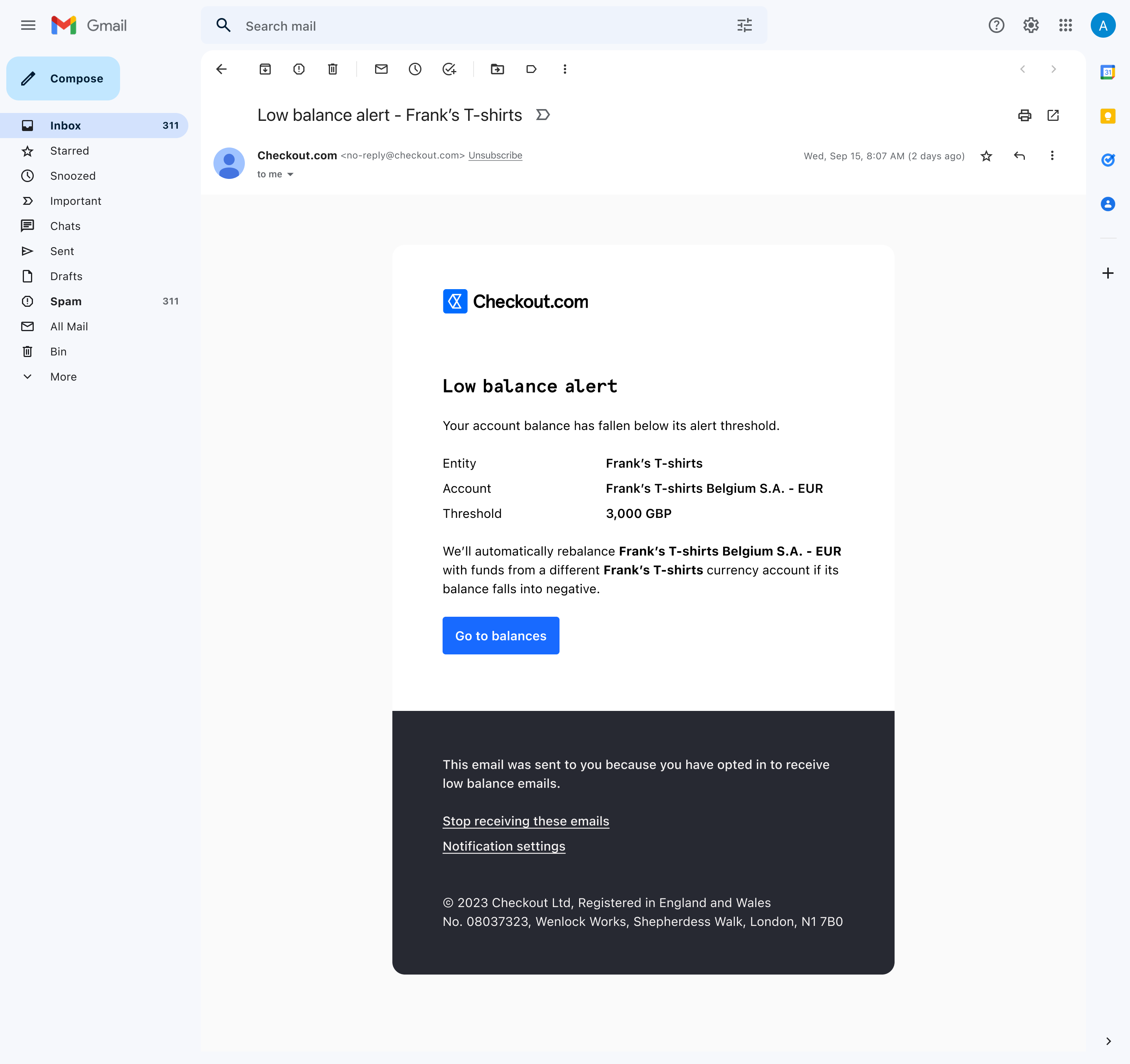

Above: Notification emails explaining when a balance has fallen below its threshold and when funds have been automatically moved to cover a shortfall.
Above: Pooling event showing funds drawn from another sub-account within the entity to complete an action, making cross-account liquidity visible.
The same movement also appeared within Transfers activity, where it was labelled as Funds Pooling rather than being hidden as background system behaviour. This meant merchants could keep funds separated into meaningful currency accounts without manually rebalancing them every time one Sub-account ran short, while still being able to trace why money had moved afterwards.


Above: Transfers activity table showing funds pooling as a labelled movement within account activity.
Top-ups
Top-ups allowed merchants to add external funds into a specific Sub-account, increasing either its Available or Operational balance. Funds never entered the Business Account as an unallocated Client or Entity-level amount; they were added into a defined Sub-account, in a specific currency and into a known balance state.
The flow asked merchants to select the source bank account, destination Sub-account and amount before choosing the appropriate local or international transfer route. Checkout then generated the bank details and reference needed to complete the payment externally, with that reference determining how the incoming funds were attributed when they arrived, including whether they were placed into Available or Operational balance depending on the configuration.


Above: Initial screen of the top-up flow showing source bank account, destination sub-account, and amount.
Above: Merchants choose a local or international bank transfer, which determines the bank details shared for payment.
Above: Top-up details showing source bank account, destination sub-account, and reference.
Once processed, the Top-up appeared in activity and contributed to the same balance history as money arriving through payments or internal transfers, so funds were represented in the same way regardless of how they entered the Business Account.
Move – making movement predictable
Move covers how funds travel between Sub-accounts, across currencies and out of the Business Account through Transfers, Settlements and Cards. Each of those actions changes the merchant's financial position, sometimes across multiple accounts, currencies and balance states, so the source, destination, currency and outcome needed to remain clear throughout the movement rather than leaving finance teams to work out what had changed afterwards.
We carried forward the account structure and balance behaviours established in Store, so money remained attached to a known Sub-account and state as it moved through the system. That gave merchants a consistent way to understand where funds had come from, where they had gone and how the movement affected the balances around them, without having to reconcile the outcome across disconnected parts of the product.
Transfers
Transfers move funds between Sub-accounts, either directly within the same currency or through FX when the currencies differ. A transfer reduces the Available balance of the sending account and increases the receiving account, changing how funds are distributed across the Business Account.
Because those movements often happen immediately, merchants needed to understand exactly what they were committing to before anything changed. The flow kept the sending and receiving accounts visible throughout, including the Entity, Sub-account, currency and Available balance, so the impact of moving funds was clear before execution rather than something merchants had to establish afterwards.


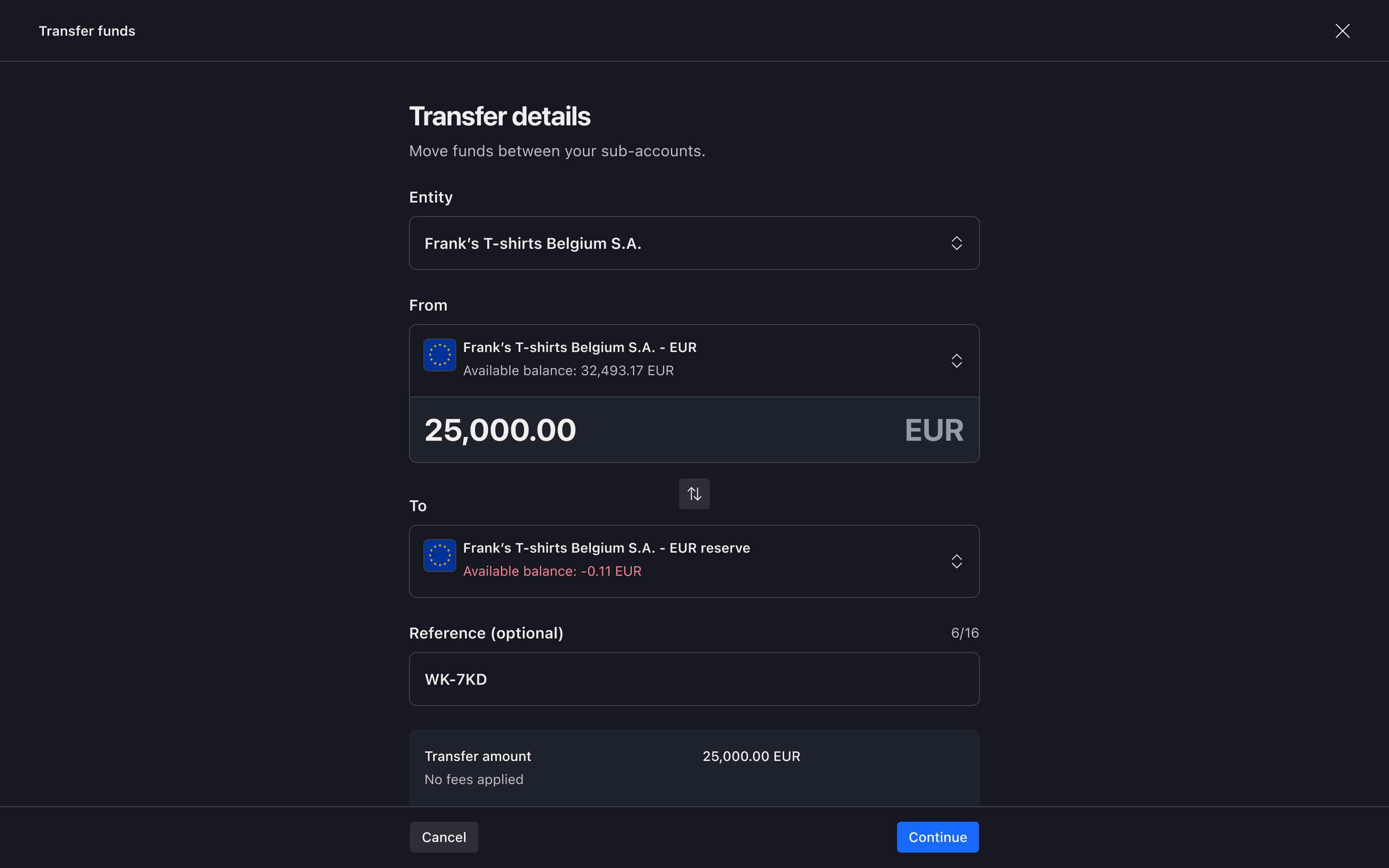


Above: End-to-end transfer experience, showing how merchants select a source and destination sub-account, review available balances, confirm same-currency or FX movement, and trace the completed transfer in activity.
The accounts available at each step were constrained to valid combinations, removing unsupported routes before a merchant could select them rather than relying on an error later in the flow. Same-currency transfers could apply the entered amount directly, while cross-currency transfers also needed to make the exchange rate, converted value and cost of the movement clear before the merchant committed to it.


Above: Cross-currency transfer details showing the selected accounts, source amount, converted value, FX rate and fees before review.
FX rates were time-bound and updated dynamically, so the entered amount remained the anchor while the converted value changed with the quote. Showing the quoted rate alongside the interbank rate and markup made the cost visible at the point the merchant was deciding whether to proceed, rather than surfacing it after the money had moved.
Every transfer passed through a final review showing the source, destination, amount, converted value where relevant and expected processing time. Insufficient funds and other problems were attached directly to the sending account, so merchants could resolve them without having to interpret a generic failure after submission.


Above: Final review showing the source, destination, amount, converted value and processing time before the transfer is executed.
The same information carried through into activity once the transfer completed. Each movement retained its source and destination and could be searched or filtered over time, giving finance teams a record of how funds had moved between accounts rather than reducing the history to a single debit or credit.
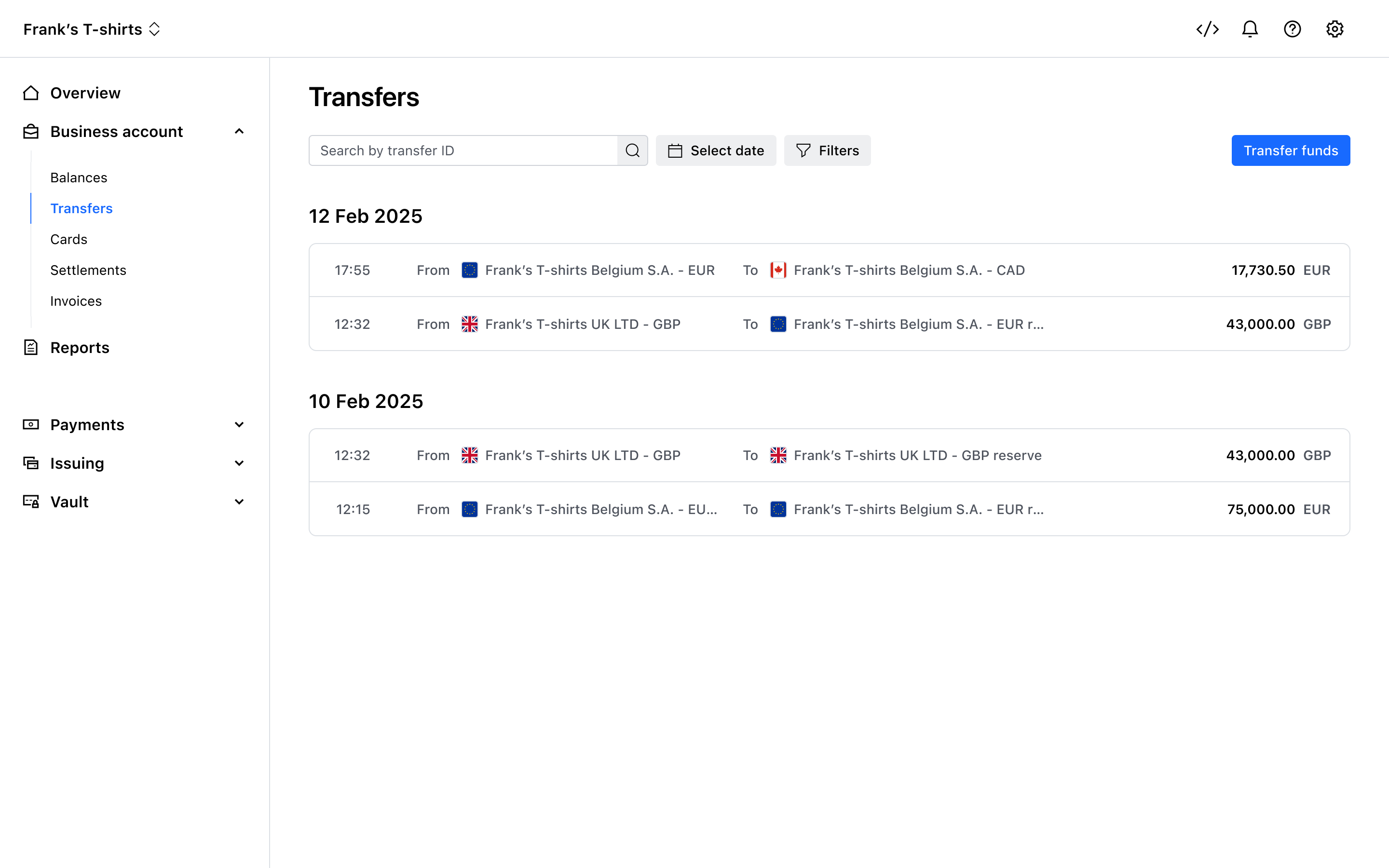
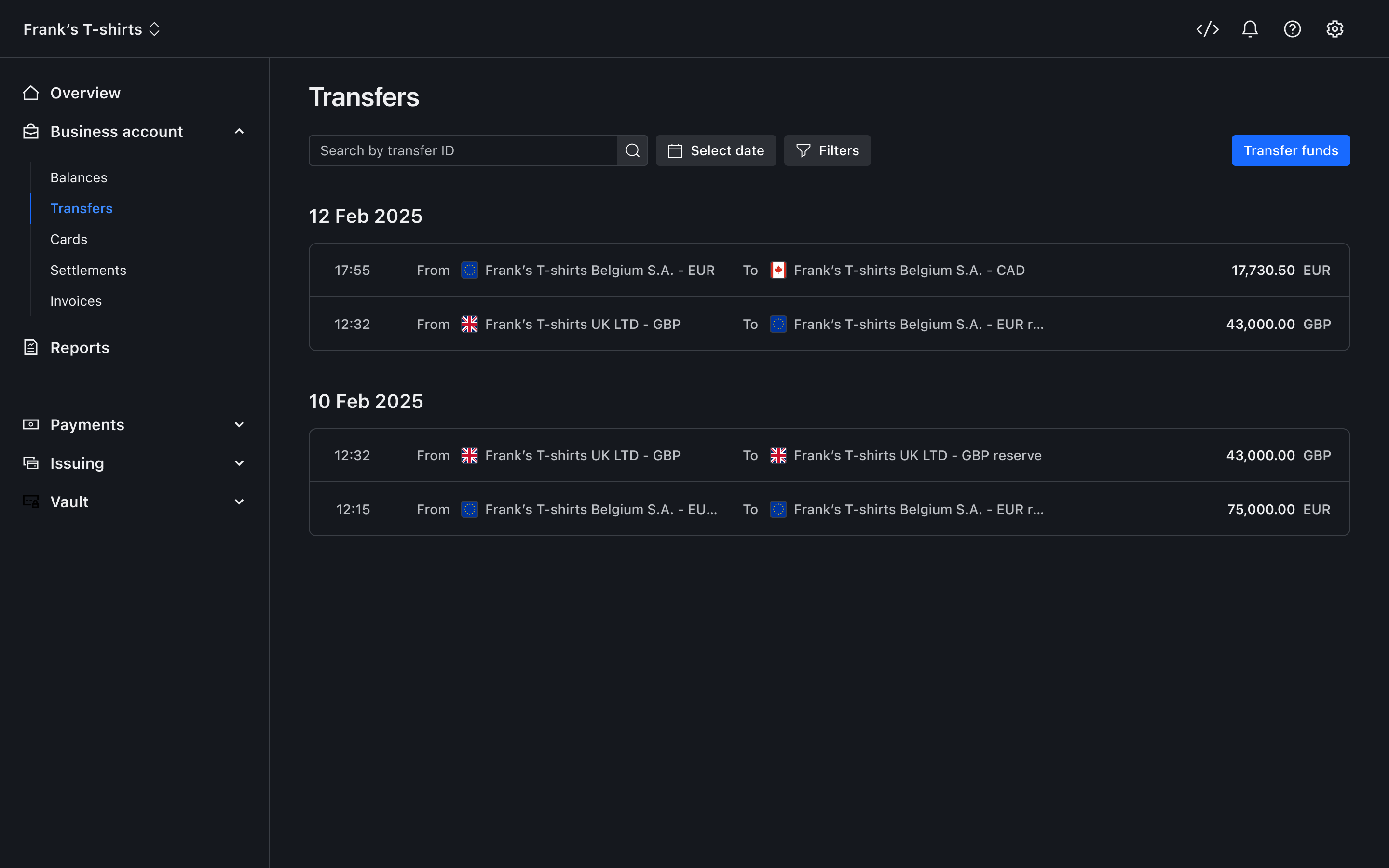
Above: Transfer activity showing movements between sub-accounts, grouped over time.
Opening an individual transfer exposed the amount, source, destination and, where relevant, the FX rate, fees and converted value that had been confirmed before execution. Keeping the recorded detail aligned with the review state meant merchants could compare what they authorised with what actually happened without reconstructing the movement from separate records.


Above: Transfer detail showing source, destination, amount, and if applicable, any fees, FX rate and converted value.
Settlements
Settlements represent funds leaving a Sub-account for an external bank account, completing the lifecycle that began when payment funds entered Checkout. Once that payout happens the money no longer sits within the Business Account, so finance teams needed to be able to follow what had left, what was still progressing towards payout and anything that had failed or been delayed without falling back immediately to bank statements or separate reports.
We presented settlements as individual payout batches tied to a specific Sub-account, currency and destination bank account. Amount, status, destination and settlement date were visible in the list, allowing merchants to distinguish between Pending, Complete and Carried forward payouts and understand which funds had actually left the platform.


Above: Settlements list showing payout batches, including amount, status, destination account, and settlement date.
Opening a settlement showed its progression from creation through processing to the expected arrival in the receiving account, making the period between funds leaving the Business Account and reaching the bank visible rather than treating payout as a single completed event.


Above: Settlement detail showing payout lifecycle, including creation, processing, and expected arrival in the receiving account.
The amount being settled was itself a net position made up of underlying activity such as payments, refunds, chargebacks and adjustments. We exposed that composition alongside reports that matched the payout, so finance teams could understand how the total had been formed and reconcile it back to the activity that generated it.
Funds therefore remained attributable even after leaving Checkout, with every payout connected to the Sub-account and currency it came from, the external account it was sent to and the underlying activity behind the amount.
Corporate cards
Corporate Cards allowed merchants to spend directly from funds already held in the Business Account, with each virtual card drawing from a specific Sub-account and reducing its Available balance as spend was authorised. Unlike a Transfer or Settlement, where a finance team deliberately moves a defined amount between two destinations, card activity can happen continuously across multiple users, merchants and currencies.
We tied that spend back to the account before a card could be used. Each card was created against a specific Sub-account and assigned to a user, with a maximum monthly spend limit applied by default and the ability to reduce that limit for the intended use. Finance teams therefore knew which funds would be used, who could spend them and the boundary of that spend before transactions started appearing.


Above: Card creation flow showing selection of sub-account, assignment, and spend configuration.
The Cards overview kept those controls visible alongside actual usage, showing each card as a distinct spending context with its limit and current spend rather than pooling card activity into an undifferentiated total.
Limits updated as transactions occurred, while opening a card brought its configuration, remaining spend and recent activity together in the same view. Finance teams could therefore understand both the controls applied to a card and how those controls were being consumed without moving into a separate reporting workflow.


Above: Card overview showing individual cards, each representing a distinct spending context with tracked usage.
Above: Card detail showing spend, limits, and recent transactions tied to a specific sub-account.
Transactions were recorded from authorisation, including Pending and Declined activity, and retained the merchant, category, location, card and Sub-account that created them. That context was captured when the purchase happened rather than reconstructed later from an external statement.


Above: Transaction detail showing status, merchant information, and associated card and sub-account.
As transactions moved from Pending to their final state, the account continued to reflect changes in the amount rather than treating the original authorisation as final. Cards could also be frozen, reassigned and have their limits adjusted directly from the product, giving finance teams a way to respond to spend as it happened.
Card spend therefore remained part of the same account structure as every other movement in the Business Account. It originated from a known Sub-account, changed its Available balance and remained attributable to the card, user and transaction responsible for it.
Borrow was about giving merchants earlier access to money that would otherwise remain tied up in the normal settlement lifecycle. Store established where funds lived and what state they were in, while Move covered how those funds could be transferred, settled or spent. Borrow extended that system by changing when merchants could access money they were already due to receive, without creating a separate account structure around it.
That distinction was important as we started introducing products that changed the timing of cashflow rather than simply moving existing Available funds from one place to another. The account still needed to make it clear which funds were available now, which were progressing through settlement and which had been brought forward.
Accelerated Settlements allowed merchants to bring forward eligible settlement funds rather than waiting for them to be paid out on their normal schedule. Instead of waiting for money to move through Pending → Available → Payable and then reach the configured bank account, merchants could access some of those funds earlier, up to a daily acceleration limit.
Under a standard settlement schedule, funds move through their existing balance states before being paid out according to the frequency, threshold, time zone and receiving bank account configured for that Sub-account. Acceleration sat within that same structure, changing when eligible funds were paid out while keeping the Sub-account, balance states and destination intact.
The settlement overview separated funds that had already been paid out, funds progressing towards their scheduled payout and funds currently eligible for instant access, so merchants could see what had happened, what was still following the normal schedule and what could be brought forward.


Above: Settlement overview separating paid out, upcoming and instantly available funds.
Acceleration operated at Sub-account level, with a daily limit controlling how much could be brought forward. The accelerated Sub-accounts panel showed which currency accounts were accelerating that day, which remained on their standard schedule, how much had already been accelerated and how much of the daily limit was still available.


Above: Accelerated sub-accounts panel showing which sub-accounts are accelerating and how much of the daily limit has been used.
Once a Sub-account reached its daily acceleration limit, any additional eligible funds continued through the standard settlement schedule. Merchants were therefore changing the timing of part of an existing settlement rather than moving money into a different account or a separate settlement flow.
Acceleration also sat within the settlement configuration merchants were already managing. At Entity level, finance teams could see which settlement schedules were accelerated across their currencies and Sub-accounts, while opening an individual schedule exposed the daily acceleration limit alongside the payout threshold, frequency, time zone and receiving bank account.
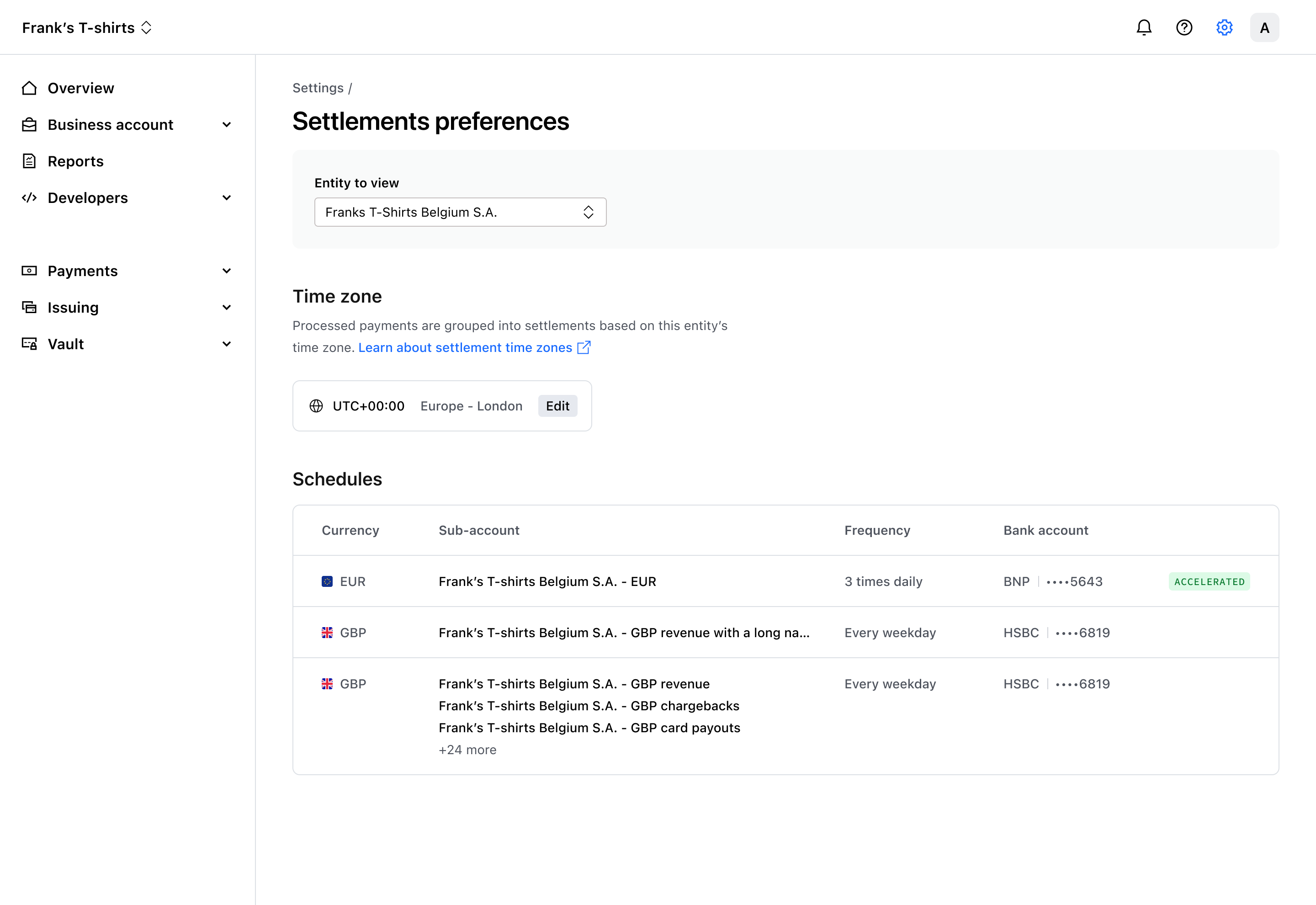


Above: Settlement settings showing accelerated schedules at entity level and the underlying schedule rules, including daily limit, payout threshold, frequency and receiving bank account.
Funds still originated from a defined Sub-account, moved through the same balance states and settled to the same configured destination, with acceleration changing only when eligible funds were paid out. Merchants could access liquidity earlier without learning a separate set of rules, while the Business Account gained a foundation for future funding and credit-based capabilities without fragmenting the underlying system.
Grow explored how funds held in the Business Account could become productive without moving into a separate product or changing the way merchants understood their accounts. Yield was the first capability we explored in that space, attaching a return directly to balances already held there.
Store, Move and Borrow had already established where funds lived, how they moved and when they could be accessed, allowing Grow to add new value to money held on platform without introducing another financial tool or another set of rules for merchants to learn.
Yield was explored as a future capability that would allow merchants to earn a return on funds held within the Business Account. Rather than asking them to move money into a separate account or product, the return could be applied directly to balances already held within a Sub-account.
The funds would remain tied to the same Entity and currency, continue to follow the same balance and ledger behaviour and remain visible in the account where the merchant already understood them. Any return generated therefore needed to be clearly attributable to the balance it came from, so earning on funds felt like an extension of holding them rather than a separate financial experience.


Above: Early concept showing yield applied to funds held within a sub-account, making earning on stored funds feel like an extension of the existing balance model rather than a separate product.
Because funds were already structured by Entity, Sub-account and currency, with defined balance states and ledger behaviour, Yield could build on those relationships instead of redefining how money was organised. A merchant could hold money, move it, access it earlier and eventually earn a return on it without those capabilities becoming separate products with their own account structures or behaviours.
That allowed the Business Account to grow in capability without losing clarity, with future financial products attaching to the same underlying account and ledger architecture rather than fragmenting the Dashboard as more ways of using money were introduced.
Monitor gave merchants a way to understand and verify what was happening across the Business Account without trying to replace the formal reconciliation that still sat within Checkout's financial reporting. Funds were distributed across Sub-accounts, moving through balance states and settlement schedules, so everyday questions about why a balance changed, whether a payout completed or where a transfer went needed to be answerable inside the account itself.
Because those movements were created across Store, Move, Borrow and Grow, Monitor ran across all four rather than existing as another standalone product area. Balance and Sub-account activity made changes traceable back to the events that caused them, giving merchants enough context to investigate what they were seeing before they needed to move into formal reporting.
The Dashboard homepage was redesigned to become a Business overview, giving merchants an immediate view of their overall funds position through the consolidated Available and Pending balances and the Entities contributing to them. We deliberately kept the overview at that level rather than turning it into another treasury workspace, with clear routes into Balances and activity within the Checkout Business Account when finance teams needed to understand the detail behind their position.
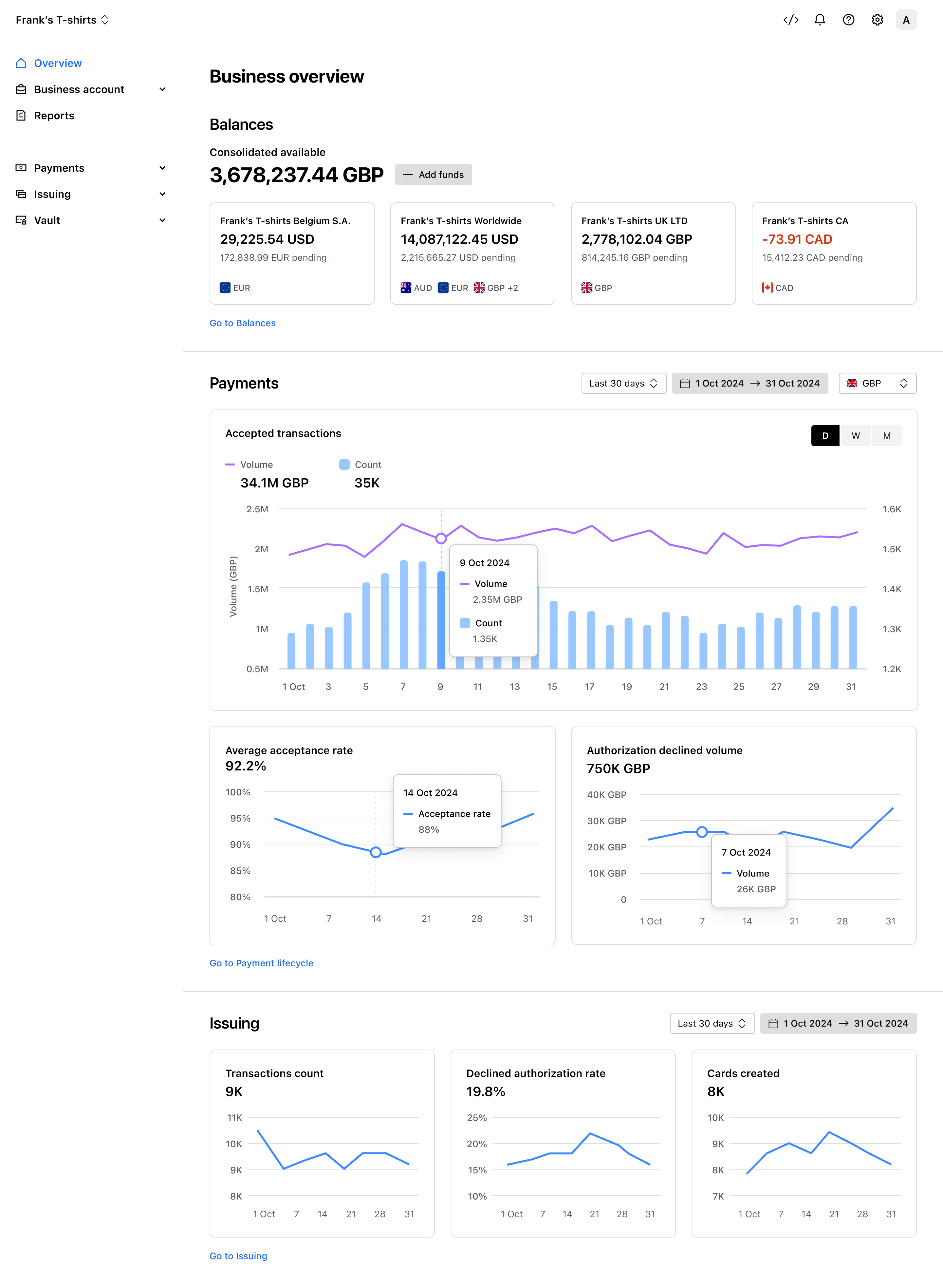

Above: The Dashboard overview showing consolidated available balance and entity-level balance summaries, giving merchants a high-level way to monitor their funds position before moving into detail.
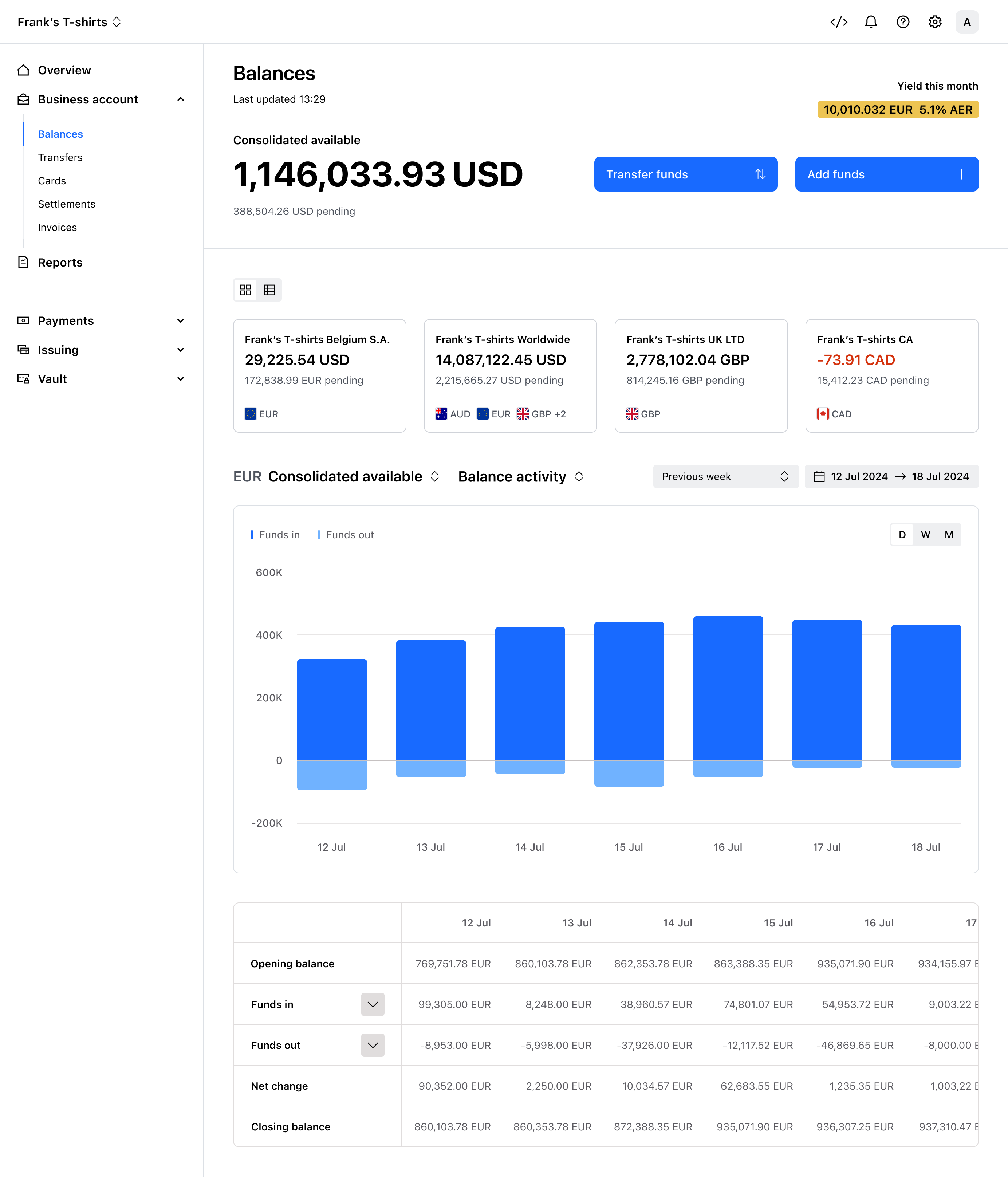
Within the Business Account section of the Dashboard, Balance activity showed how a balance had changed over time and which events had contributed to that movement. Payments, Settlements, Transfers, Top-ups, fees and card spend could all change the position, so understanding the current number also meant being able to explain how it had changed.
The view combined movement across the selected period with the underlying breakdown of opening balance, funds in, funds out, net change and closing balance. Finance teams could see the direction of travel quickly, then move into the categories and activity behind it when they needed to understand what had driven the change.


Above: Balance activity showing how funds moved in and out over time, making changes traceable to individual events without leaving the Business Account.
The breakdown connected changes in Available balance back to activity such as captures, Top-ups and Transfers, allowing finance teams to investigate an unexpected movement inside the Business Account rather than exporting reports simply to work out what had happened.
At Sub-account level, the same relationship between position and movement became the chronological activity of a single currency account. Each event was timestamped and tied to the activity that created it, allowing finance teams to follow how that account's balance had been formed over time.


Above: Sub-account view showing chronological account activity for a single currency, including settlements, withdrawals and transfers.
A finance team could identify a movement at the consolidated level, move into the relevant currency account and inspect the events behind it without losing the relationship between the Sub-account, its Entity and the wider Client position.
Settlements and Transfers appear in Move as actions merchants initiate, but the record they leave behind also becomes part of how finance teams investigate the account afterwards. Completed and in-progress movements retained their source, destination, amount, timing and status, so merchants could follow what happened after execution and understand how it affected the balances around it.
Questions such as why a balance changed, whether a payout had completed, which Transfer moved a particular amount or what happened to funds after they left a Sub-account could be answered by following the movement itself rather than piecing together unrelated records.

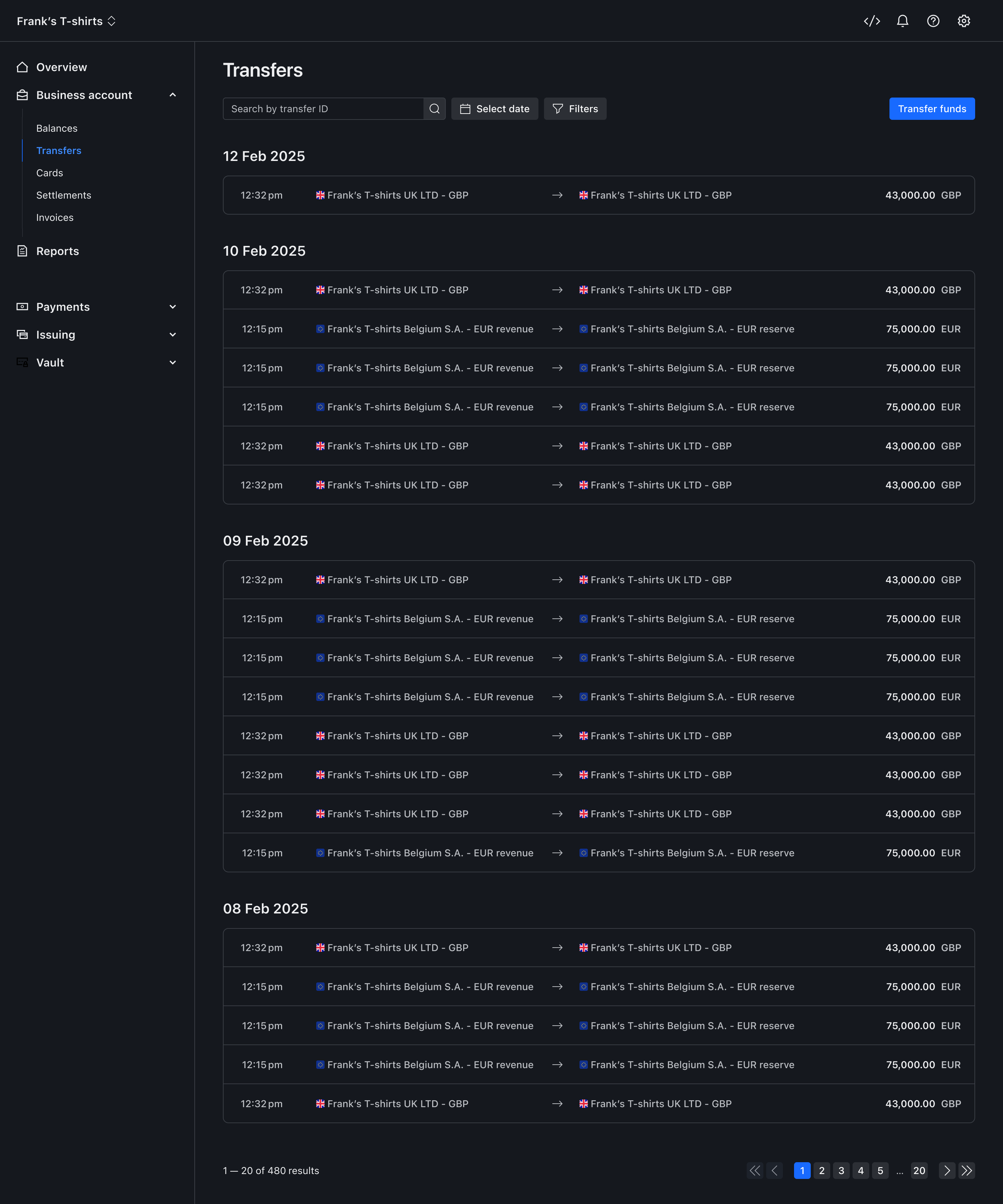
Above: Transfer activity showing how completed movements can be followed after they occur, including timing, source, and destination.
The Business Account was never intended to replace the detailed financial reporting required for formal reconciliation. It gave merchants enough visibility into everyday movement to understand their position, investigate changes and trace activity back to the event that caused it, while keeping deeper reconciliation available when they needed that level of detail.
The challenges in the Business Account weren't isolated feature problems, but system level tensions between clarity and completeness, flexibility and control, and speed and coherence.
The Business Account's defining design challenge was coherence.
Each capability – Balances, Transfers, Settlements, Corporate Cards, Funds Pooling, and Accelerated Settlements – had its own engineering team, constraints, and interaction logic. Left alone, they would have formed a set of disconnected financial tools.
The challenge was to establish a shared language – structural, visual, and terminological – that made them feel like parts of a single Business Account, rather than a collection of features with a shared header.
This was not just about interface consistency. It meant defining common rules for how funds were structured, how movement was represented, how balance states behaved, and how activity could be traced across the system.
The Business Account served treasury and finance professionals who needed granular detail – multiple balance states, settlement progression, FX markups, payout timing – and general managers who needed a simple answer to "what do I have available?"
Designing a single interface that served both without compromise required precise decisions about hierarchy and disclosure.
The surface of the product needed to provide clarity quickly, while deeper views needed to expose the operational detail required to investigate, reconcile, and act with confidence.
The challenge was knowing where detail added trust, and where it created noise.
The Business Account put the Design team in close contact with enterprise treasury management – a specialist domain where users often knew more than the people designing the product.
We risked oversimplifying and building something finance experts would dismiss as not for them, or defer too readily to complexity and reproduce treasury software patterns without questioning whether they were necessary.
We kept tight feedback loops with treasury and finance experts throughout, and developed enough domain literacy to know when to simplify and when complexity was load-bearing.
That became especially important when working through concepts like balance states, settlement timing, FX costs, payout schedules, and reconciliation. These were not just details in the interface. They shaped whether merchants trusted the system.
The Business Account was delivered across phases, not as a single launch.
Each phase needed to feel complete to the merchants using it, even though the product itself was still expanding. New capabilities had to integrate into the same account model without introducing fragmentation or forcing merchants to relearn how the system worked.
The five verb framework helped here. Store, Move, Borrow, Grow, and Monitor gave each release a clear position within the overall arc, so new functionality could be introduced without breaking the underlying system.
This made sequencing a design problem as much as a product problem. Store needed to establish trust before Move could ask merchants to act. Move needed to make settlements legible before Borrow could introduce acceleration. Grow only made sense once merchants were confident leaving funds on platform.
The challenge was shipping incrementally without making the product feel unfinished, and scaling capability without turning the Business Account into another set of disconnected tools.
Between Q1 2025 and Q1 2026, the Business Account validated the central product bet. When merchants could understand where funds were held, when they could use them, and how money moved through the system, they were willing to keep and operate more funds on platform.
The impact showed up across merchant behaviour, liquidity, operational efficiency and usability. Funds held and used on platform grew significantly, accelerated settlements created a new liquidity behaviour, and standardised settlement models reduced the need for bespoke operational work.
Funds held on platform
$731M
+101% YoY
Total value of funds held across all Business Accounts (Q1 2026)
This was the core behaviour change the product set out to create. Merchants who had previously swept most funds out of Checkout were now treating the platform as a place money could live.
Balance utilisation
$853M
+113% YoY
Funds used across payouts, cards and transfers (Q1 2026)
Held funds only matter if they become operational. Utilisation growing faster than holdings showed that merchants were not just parking money on platform. They were running parts of their financial workflow from it.
Monthly acceleration
$595M
Monthly volume of funds accessed early via Accelerated Settlements (Jan 2026)
Adoption at this scale depended on the settlement-legibility work. In testing, merchants would not accelerate funds confidently if they could not understand what was being brought forward, what remained scheduled and how the standard settlement flow worked.
Standard settlements
94.2%
Adoption of the default settlement model (Jan 2026)
This showed that more merchants were accepting the productised settlement model rather than relying on bespoke configurations. That was important because the goal was not only to expose settlement data, but to make complex settlement behaviour understandable enough to scale.
Manual operations reduced
37%
Reduction in manual settlement workflows (2025)
This connected directly to the problems found in research. Finance teams had been manually checking balances, calculating settlement amounts and reconciling across disconnected sources. Forecastable pending funds and traceable balance activity gave them a clearer way to understand what was happening inside the account.
Liquidity risk mitigated
$100M
Reduction in unmanaged liquidity exposure per year (annualised)
This showed the value of making funds easier to understand, allocate and act on before they became a downstream operational problem.
System usability
89/100
System Usability Scale
Usability of onboarding and the account experience.
The significance of these outcomes is that they were not isolated feature metrics. They showed that merchants were willing to hold funds, use funds, bring funds forward and accept standardised financial workflows when the account structure and its behaviour were clear enough to trust.
These were business outcomes with many contributors across Commercial, Product and Engineering. Design's role was to create the account structure, behaviours and experience that allowed those capabilities to work coherently around the merchant's money, making it possible to understand where funds were, what could be done with them and how an action changed the wider position.
Reflection
The Business Account was one of those pieces of work where the design challenge was much bigger than the interface.
The hardest part was not designing balances, transfers, settlements, cards or acceleration in isolation. It was making them behave like one financial system that merchants could understand and teams could keep extending.
That meant the quality of the work depended on the strength of the underlying structure. Once the account structure was clear, the design decisions had something to anchor to. We could decide what belonged in Store, what belonged in Move, what needed to sit across Monitor, and where new capabilities could extend the system without creating another disconnected product.
It also reinforced how important it is to solve the structure and system behaviour before the screens. The early workshopping, assumption mapping and structural exploration gave the team a shared way to make decisions later. Without that, the product could easily have become a set of well-designed surfaces that did not quite add up.
One thing I have carried forward is how deliberately we built collaboration into the way the programme worked. The best moments were not handovers. They were the workshops, reviews and build conversations where Product, Design and Engineering were working through the same problem from different angles.
This was so important because the Business Account could easily have become a set of related features built by different teams. What kept it coherent was a shared understanding of the system, the rituals around it, and the willingness to challenge each other before decisions became too expensive to unwind. Complex product work needs more than good alignment. It needs an operating rhythm that keeps the product, experience and system behaviour connected as the work moves through discovery, design and delivery.
That is what made the Business Account hold together. It was not a set of features designed separately and stitched together at the end. It was one connected product that Product, Design and Engineering shaped, challenged and shipped together.


